
On this page
Sharing a link and hearing nothing back is frustrating. Did anyone open it? Did the post in your Telegram channel work better than the one on X? Thpaste analytics answer that — for every paste you make while signed in, from day one, on the free plan. No "creator tier" to unlock first.
Your dashboard at a glance
The dashboard is the first thing you see after signing in. Four cards sum up your account, a chart shows the last 30 days (or 3 months), and your top pastes sit on the right with a Copy button each — so sharing your best performer again takes one tap.

| Card | What it counts |
|---|---|
| Total views | Every time one of your pastes was opened |
| Total pastes | How many pastes your account has made |
| Avg views | Total views ÷ pastes — a quick measure of reach |
| Followers | People following your public profile |
The Analytics page, section by section
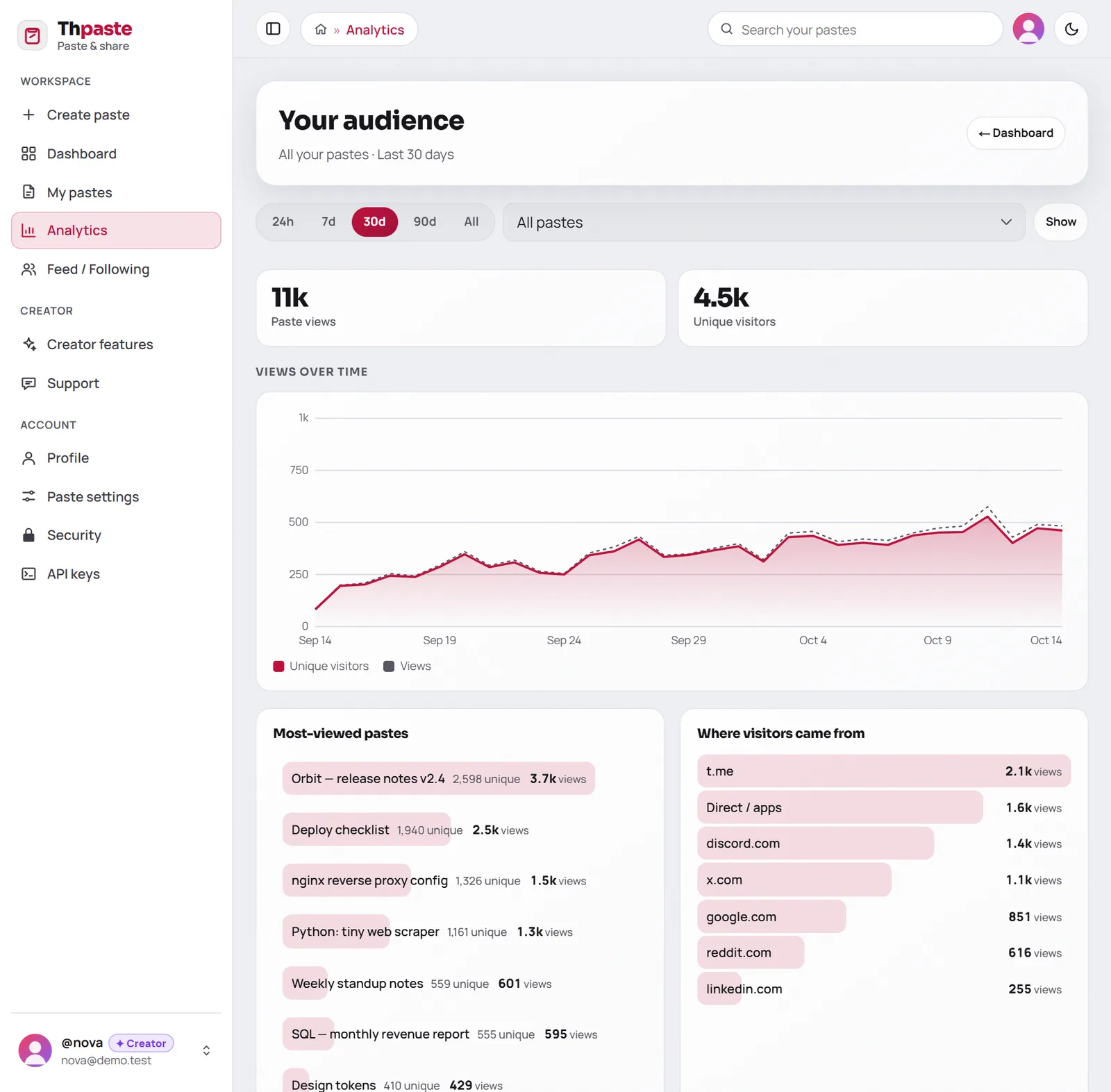
Open Analytics in the sidebar for the full picture. Pick a time range at the top, and optionally narrow everything down to a single paste.
- 1Views over time
The red line is unique visitors, the dotted line is total views. A gap between them means people are coming back.
- 2Most-viewed pastes
Ranked by views in the range you picked, with unique visitors next to each.
- 3Where visitors came from
The site that sent each visitor — Telegram, X, Discord, Google and so on. "Direct / apps" is people who typed the link or opened it from an app that doesn't say where it came from.
- 4Countries and devices
Which countries your readers are in, and whether they're on phones, desktops or tablets.
Views vs unique visitors
These two numbers tell different stories:
- Views go up every time a paste is opened — including the same person opening it five times.
- Unique visitors count each reader once per range.
Reading the gap
If views are much higher than unique visitors, readers are coming back — typical for reference material like cheat sheets, rules or link lists. If they're almost equal, most people read once and leave — typical for announcements.
Turn the numbers into decisions
Here's what a week of numbers might look like for someone sharing a release note in three places:
Reading a chart like that, you'd post the next release in your Telegram channel first, keep Discord in the mix, and give the title a searchable name since Google is sending people too.
| If you see… | Try… |
|---|---|
| One source dominates | Post there first next time, and at the same hour |
| Lots of phone visitors | Keep paragraphs short; rich text or Markdown read better than walls of plain text |
| Views spike then vanish | Make it reference material: add a table of contents and keep it updated |
| A paste keeps getting views months later | Give it a custom link and pin it in your channel |
Privacy, done properly
Analytics on Thpaste are first-party: Thpaste counts views itself instead of handing your readers' data to an advertising network. You see aggregate numbers — counts by country, device and source — never who your readers are. Bots and crawlers are filtered out, so the numbers reflect real people.
Want the numbers in your own tools?
Everything on the Analytics page is also available from the API's GET /stats endpoint — same ranges, same breakdowns — so you can build your own reports or a weekly summary bot. See getting started with the API.
FAQ
Do anonymous pastes have analytics?
No — analytics belong to an account. Create a free account before you publish and every paste you make is tracked from its first view.
Why does my paste's view counter differ slightly from the Analytics page?
The counter on a paste counts every opening, while the Analytics page filters out bots and collapses accidental double-loads.
Can I see analytics for one paste only?
Yes: choose it in the paste selector at the top of the Analytics page.
See who's reading
Create a free account and every paste you make gets analytics from its first view.
Create a free account

